Memory Management
Introduction to memory management in operating system, different techniques of accessing main memory etc...
- Memory management module in operating system controls and manages the main memory (RAM) ensuring processes have allocated memory when needed while keeping the overall system fast, secure, and stable.
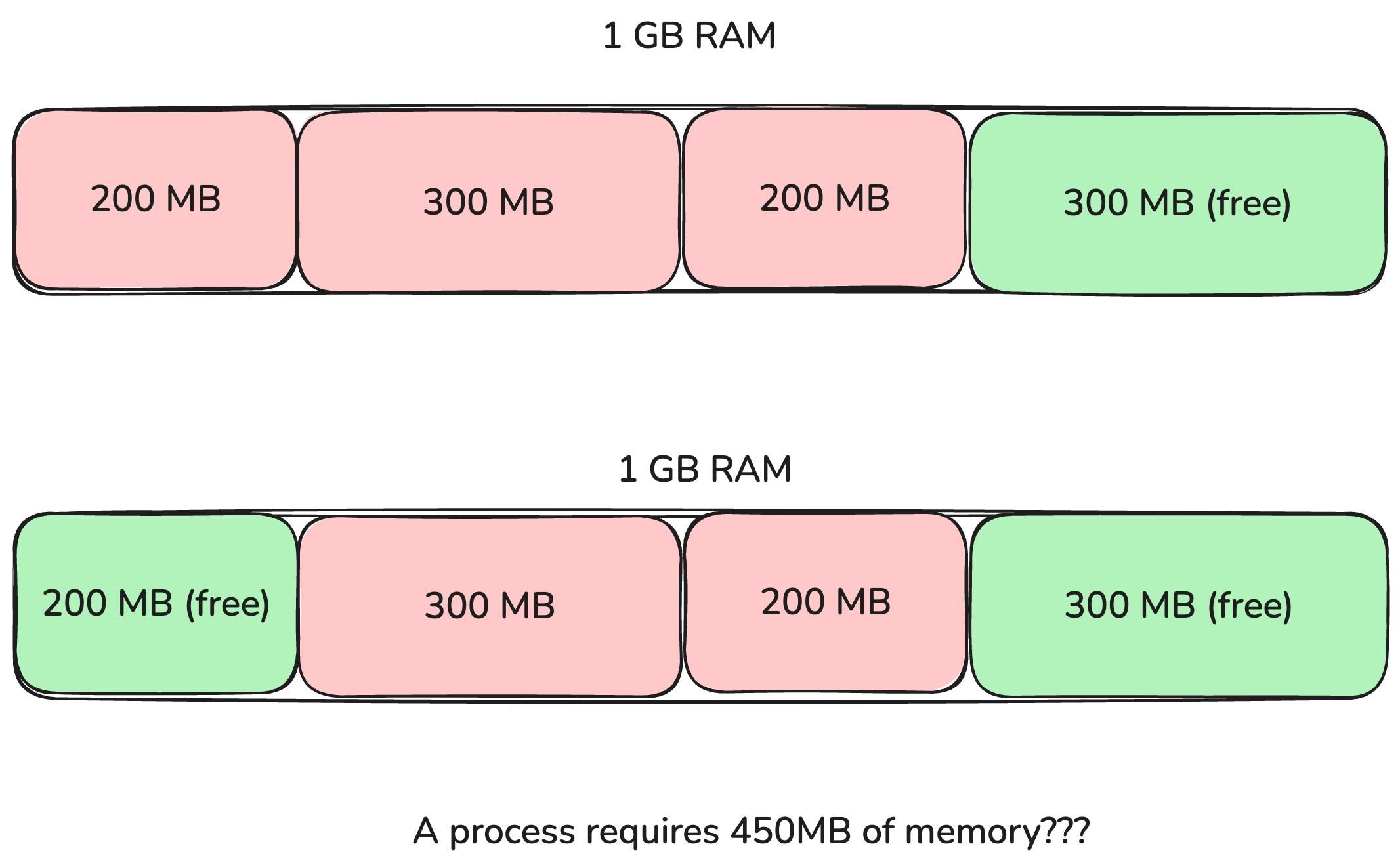
- Why does memory management required? Let's look at the below image. When the memory was allocated contiguously, when the 200 MB process is finished, another process is asking for 450 MB, the operating system wouldn't have it. It fails with OOM (out of memory) error.
- The operating system's memory management provides these benefits
- Process Isolation: Prevents process A from reading or modifying the memory space of process B
- Dynamic Allocation & Deallocation: Automatically allocates memory to programs when they start or request memory and reclaims it when processes terminate.
- Extending disk space: Uses disk space (swap/pagefile) as extra memory via Virtual Memory, allowing systems to run applications larger than total physical RAM.
Virtual Memory
- Virtual Memory solves the above fragmentation problem by creating a virtual layer extending disk storage along with the physical memory and allows running of larger programs that require large RAM than physical memory.
- Virutal Memory provides contiguous locations of memory on the virtual memory but under the hood it maps to the multiple fragmented physical memory and the disk storage.
Virtual Memory Address Translation
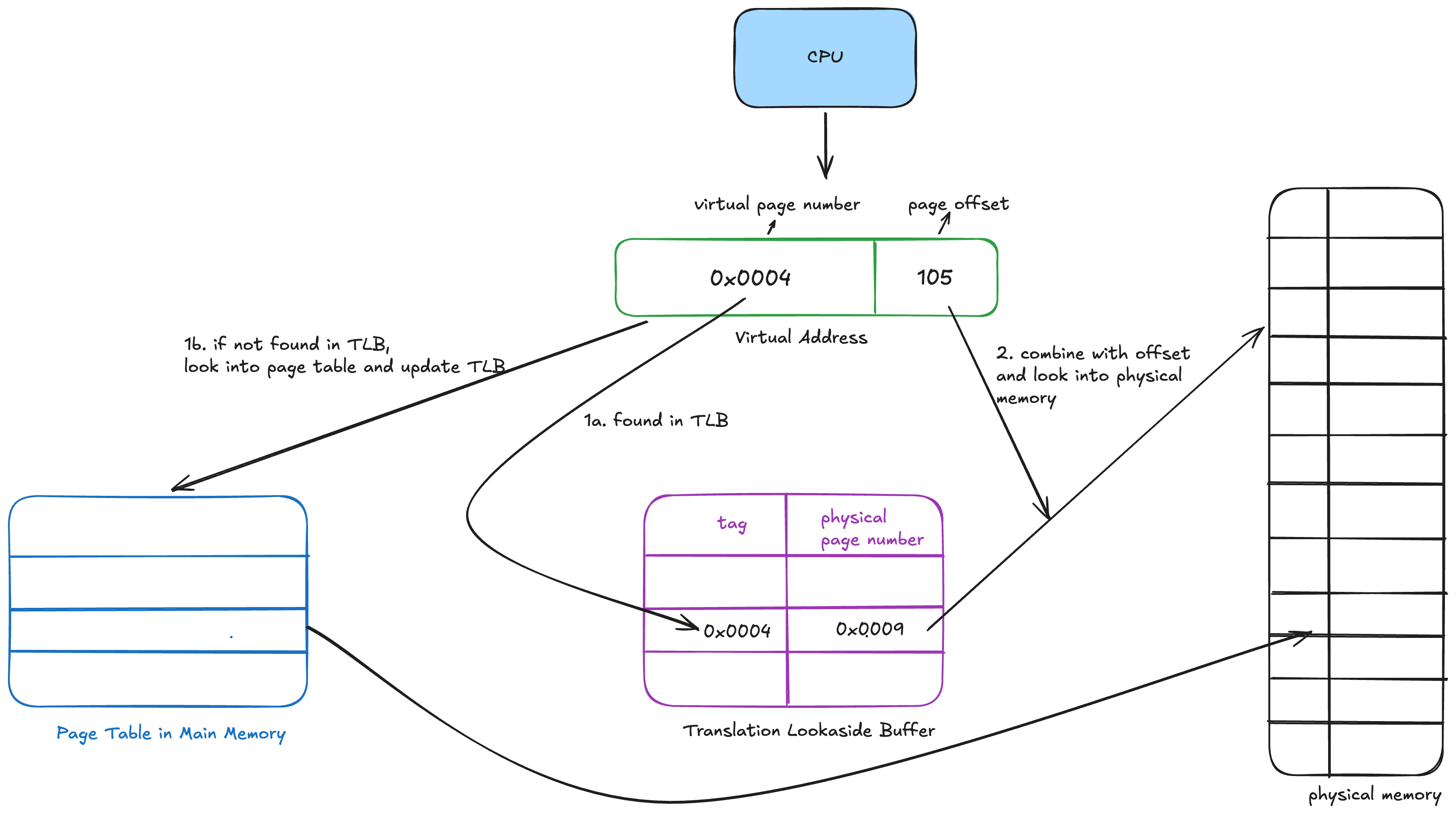
- A virtual address generated by the CPU is split into two parts
- Virtual Page Number (VPN): Identifies which page of virtual memory holds the data.
- Page Offset: The exact location/byte inside that page (remains unchanged during translation).
- Extract the VPN and Offset: When the CPU executes an instruction targeting a virtual address, the MMU splits the address into the Virtual Page Number (VPN) and the Offset.
- Check the Translation Lookaside Buffer (TLB): The MMU searches its ultra-fast hardware cache, the TLB.
- TLB Hit: The physical frame mapping is found instantly.
- TLB Miss: The MMU must query the main memory's Page Table. The MMU uses the VPN as an index to look up the process's Page Table stored in RAM. It retrieves the corresponding Physical Frame Number (PFN)
- Construct Physical Address:The MMU combines the Physical Frame Number (PFN) with the original Offset to point directly to the exact byte in physical RAM.
How does virutal memory handles fragmentation of virutal space?
- OS manages virtual memory by allowing processes to request only a fixed page sizes (eg: 4 KB, 1 MB, 2 MB etc..). This reduces fragmentation to an extent.
L1/L2/L3 Cache
- These caches store the physical address to the data mapping. Any data that process creates (such as arrays, dictionaries etc...) is stored in these caches for faster retrieval
L1 Cache (Level 1)
- Smallest and fastest cache, sitting closest to each CPU core
- Typically 32–64 KB per core
- Access latency: ~1–4 CPU cycles
- Private to each core — no sharing
L2 Cache (Level 2)
- Bigger but slower than L1
- Typically 256 KB – 1 MB per core
- Access latency: ~10–20 cycles
- Traditionally private per core, though some designs share L2 across a pair of cores
L3 Cache (Level 3)
- Largest and slowest of the three, but still much faster than main memory (RAM)
- Typically several MB to tens of MB
- Access latency: ~30–70 cycles
- Usually shared across all cores on the chip, acting as a common pool
Virtual Address
      │
      ▼
   TLB lookup (MMU) ──── hit ──────► Physical Address ready
      │                                      │
    miss                                     ▼
      │                              L1 cache check
      ▼                                      │
 Page table walk                          miss│hit → done
      │                                      ▼
      ▼                              L2 cache check
 Fill TLB, get                               │
 Physical Address                         miss│hit → done
      │                                      ▼
      └─────────────────────────────► L3 cache check
                                              │
                                           miss│hit → done
                                              ▼
                                         Main Memory (RAM)