SSL, TLS & mTLS
How SSL, TLS, and mTLS secure a connection, the TLS 1.2 handshake step by step, and when mutual TLS is worth its cost
SSL vs TLS vs mTLS
SSL and TLS are both protocols: sets of rules for how a client and server agree on encryption. SSL came first, later TLS replaced it. People still say "SSL" out of habit, but the real SSL versions (SSL 2.0, SSL 3.0) are broken and no longer used. Any connection called "SSL" today almost always runs TLS.
You may then wonder what is OpenSSL command we use in terminal? Well, it's is not a protocol. It is a library and command-line tool that implements TLS (and, in its early years, SSL). It kept the name "OpenSSL" from the 1990s, before TLS existed. Modern OpenSSL negotiates TLS 1.2 or TLS 1.3 by default and no longer supports SSL 2.0 at all.
TLS has several versions. TLS 1.2 is still common. TLS 1.3 is newer and faster. Both agree on a shared secret first, then encrypt all traffic with keys derived from it.
What is mTLS? Plain TLS proves only the server's identity. The client checks the server's certificate. The server does not check the client. mTLS adds a certificate check in the other direction too: the server also verifies who the client is before any data moves. That two-way check is why it is called mutual TLS.
SSL/TLS 1.2 Flow
The main goal of SSL/TLS protocol is to ensure security, data integrity and avoid man-in-the-middle attacks. In layman terms, as the client and server talk through the public internet, no attacker in the middle should be able to see what data was being sent.
The TLS Handshake Protocol involves the following steps:
-
Exchange hello messages to agree on algorithms, protocol versions, exchange random values.
-
Exchange the necessary cryptographic parameters (random values generated by each) to allow the client and server to generate a premaster secret using asymetric encryption algorithms such as Diffie-Hellman.
-
Exchange certificates and cryptographic information to allow the client and server to authenticate themselves.
-
Generate a master secret from the premaster secret using symmetric encryption algorithms.
Step-by-step explanation
- ClientHello — When a client first connects to a server, it is required to send the ClientHello as its first message. Client proposes a TLS version, cipher suites it supports, and sends client_random (28 bytes of randomness + timestamp). Below is the structure from RFC
struct {
       ProtocolVersion client_version;
       Random random;
       SessionID session_id;
       CipherSuite cipher_suites<2..2^16-2>;
       CompressionMethod compression_methods<1..2^8-1>;
       select (extensions_present) {
           case false:
               struct {};
           case true:
               Extension extensions<0..2^16-1>;
       };
} ClientHello;
- ServerHello — server picks a cipher suite from the client's list, sends server_random. Below is the structure of the message. If the session_id is non-empty, the server will look in its session cache and reuse the existing session. The cipher suite is nothing but a collection of key exchange algorithms such as RSA, DH_DSS (Diffie-Hellman), ECDH_ECDSA etc... These algorithms will be used to exchange the pre-master secret without being sent through the public internet.
struct {
          ProtocolVersion server_version;
          Random random;
          SessionID session_id;
          CipherSuite cipher_suite;
          CompressionMethod compression_method;
          select (extensions_present) {
              case false:
                  struct {};
              case true:
                  Extension extensions<0..2^16-1>;
          };
} ServerHello;
-
Certificate (server) — server sends its cert chain (e.g. its leaf cert, plus intermediates). Client will later validate this against its own truststore.
-
ServerKeyExchange — only present for DHE/ECDHE cipher suites. Server sends its DH/ECDH parameters (p and g) and public value, signed using the private key matching its certificate — this signature is what proves the DH params actually came from the server, not an attacker doing a MITM. (Not present for static RSA key exchange — server's cert public key is used directly instead.)
enum {
    dhe_dss, dhe_rsa, dh_anon, rsa, dh_dss, dh_rsa
} KeyExchangeAlgorithm;

struct {
  opaque dh_p<1..2^16-1>;
  opaque dh_g<1..2^16-1>;
  opaque dh_Ys<1..2^16-1>;
} ServerDHParams;

dh_p
 The prime modulus used for the Diffie-Hellman operation.

dh_g
 The generator used for the Diffie-Hellman operation.

dh_Ys
 The server's Diffie-Hellman public value (g^X mod p).
What is Diffie-Hellman Key Exchange Algorithm?
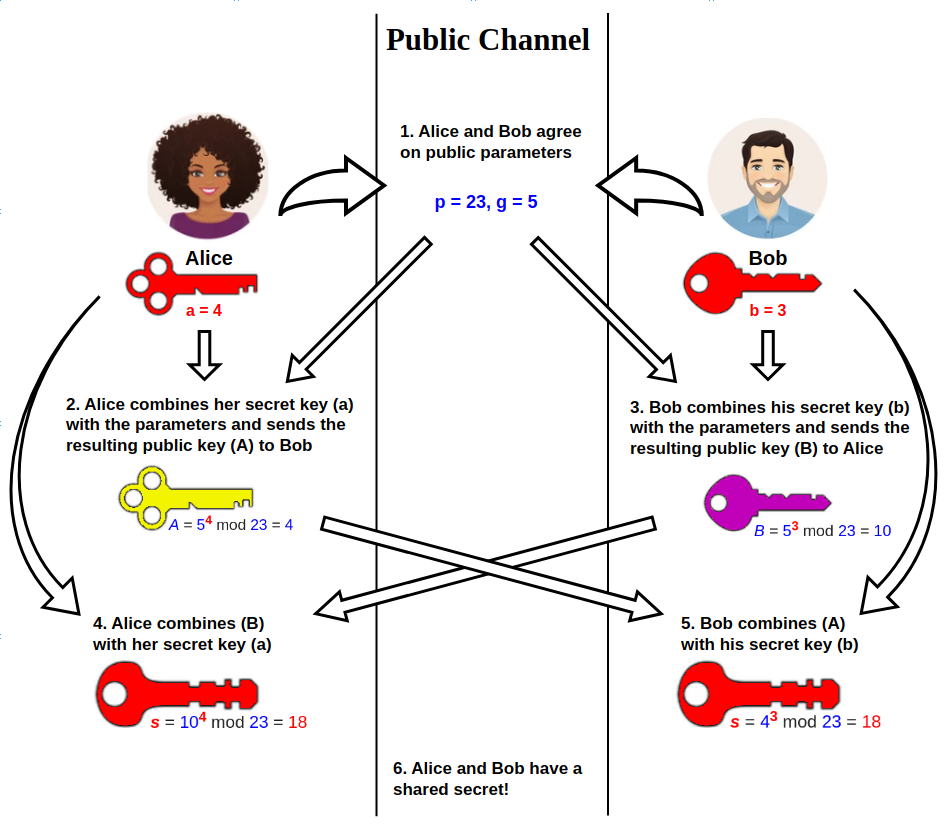
Source: Diffie–Hellman key exchange — Wikipedia
- CertificateRequest — only present when mTLS is required. Server sends the list of CAs it will accept for the client's certificate (e.g. GoDaddy DN). The
DistinguishedNamein the below struct depicts the same.
struct {
  ClientCertificateType certificate_types<1..2^8-1>;
  SignatureAndHashAlgorithm
    supported_signature_algorithms<2^16-1>;
  DistinguishedName certificate_authorities<0..2^16-1>;
} CertificateRequest;
- ServerHelloDone — server signals it's done with this phase.
struct { } ServerHelloDone;
-
Client validates — checks server cert chain (from leaf to root) against the local truststore, verifies the ServerKeyExchange signature.
-
ClientCertificate — This message is only sent if the server requests a certificate i.e. mTLS flow. If no suitable certificate is available from the list of DNs the server accepts (Remember, client sends list of DNs in CertificateRequest), then the client sends a certificate message containing no certificates. Otherwise, client sends its own cert chain (GoDaddy-signed, in your case).
-
ClientKeyExchange — This is sent after the
ServerHelloDone(if mTLS is not required by the server) orClientCertificate(if mTLS is required by the server). Client sends its DH/ECDH public value (if DHE/ECDH key exchange algorithm was agreed earlier) so that both client and server can generate the same premaster secret independently or the RSA-encrypted premaster secret (incase of RSA key exchange).
struct {
    public-key-encrypted PreMasterSecret;
    pre_master_secret;
} EncryptedPreMasterSecret;

struct {
    select (KeyExchangeAlgorithm) {
       case rsa:
           EncryptedPreMasterSecret;
       case dhe_dss:
       case dhe_rsa:
       case dh_dss:
       case dh_rsa:
       case dh_anon:
           ClientDiffieHellmanPublic;
    } exchange_keys;
} ClientKeyExchange;

struct {
  opaque dh_Yc<1..2^16-1>;
} ClientDiffieHellmanPublic;

dh_Yc
 The client's Diffie-Hellman public value (Yc).
For RSA key exchange, the client generates a random 48-byte value: 2 bytes for its proposed TLS version, 46 bytes of randomness. It encrypts this value with the server's RSA public key, taken from the certificate the server sent in step 3, and sends the result as EncryptedPreMasterSecret. Only the server can decrypt it, since only the server holds the matching private key.
- CertificateVerify — only present when mTLS is required. Client signs a hash of the handshake transcript so far with its private key, proving it holds the private key for the cert it just sent.
struct {
   digitally-signed struct {
       opaque handshake_messages[handshake_messages_length];
   }
} CertificateVerify;
- Both sides derive secret keys independently — using premaster secret, client random, server random. No shared secret is ever transmitted in the DHE/ECDHE case. Also, The pre_master_secret should be deleted from memory once the master_secret has been computed.
master_secret = PRF(premaster_secret, "master secret", client_random + server_random)
key_block      = PRF(master_secret, "key expansion", server_random + client_random)

PRF is pseudo random function
PRF is a pseudorandom function built from the negotiated hash algorithm. The key_block is then split into the symmetric keys used to encrypt and authenticate application data.
- ChangeCipherSpec + Finished (client) — The client sends
ChangeCipherSpecmessage of length a single byte. It says that from next message onwards, the communication will be switched to encrypted communication using the new secret derived. Then, it sends a Finished message (MAC/hash of the full transcript), proving nothing was tampered with and confirming both sides derived the same keys.
struct {
  opaque verify_data[verify_data_length];
} Finished;

verify_data
 Pseudo Random Function(PRF)(master_secret, finished_label, Hash(handshake_messages))
    [0..verify_data_length-1];
-
ChangeCipherSpec + Finished (server) — server does the same on its side.
-
Application data — from here on, everything is encrypted using the symmetric keys derived from the key block (e.g. AES-GCM), not asymmetric crypto.
Sequence Diagram
Mutual TLS (mTLS)
In one-way TLS, only the server proves its identity. Any client can connect, as long as it trusts the server's certificate. A browser visiting a public website works this way — the browser never needs its own certificate.
mTLS is different. Both sides present a certificate, and both sides check it. The server adds two extra handshake messages: CertificateRequest, which lists the certificate authorities it accepts, and a later check of the client's Certificate and CertificateVerify messages.
mTLS fits systems where every caller must be a known, trusted identity, not just any user with a browser:
- Service-to-service calls inside a zero-trust network, where each service holds its own certificate.
- APIs used by a small, fixed set of banking partner systems, each issued a certificate at onboarding.
- Internal admin tools where a leaked password alone should not be enough to gain access.
mTLS has a cost. Every client needs a certificate, and certificates expire and must be rotated. A service with thousands of anonymous public users has no practical way to issue each one a certificate, so mTLS stays rare in that setting.
Different file formats of SSL certificates
A certificate can arrive in different file formats. Each format sets how the bytes are encoded, text or binary. Each format also sets what the file holds: one certificate, a full chain, or a private key.
-
DER — DER is the binary form of a PEM certificate. Java tools and Windows tools often need DER directly. A
.derfile has noBEGINline and noENDline. You cannot open a.derfile as plain text. -
PEM — A certificate's data is first serialized into DER, a binary format. PEM does not change this data — it Base64-encodes the same DER bytes into printable text, then wraps that text between a
-----BEGIN CERTIFICATE-----line and an-----END CERTIFICATE-----line so that email systems, browsers, terminals can work seamlessly without bothering about data mangling. Decoding the Base64 text back gives the exact same DER bytes. PEM is the most common format. Files with a.pem,.crt,.cer, or.keyextension usually hold PEM data. A PEM file can hold a single certificate, or several certificates concatenated one after another — the leaf certificate followed by its intermediates. A private key is usually kept in its own separate PEM file, not mixed in with the certificates. -
CRT / CER — CRT and CER are not real formats on their own. A
.crtfile or a.cerfile is almost always PEM. But it can also be DER. Check the first bytes to find out: if the file starts with-----BEGIN, it is PEM; if not, treat it as DER. -
KEY — A
.keyfile holds the private key. It stays in its own file, separate from the certificate. It is usually PEM-encoded. Keep this file off any public server or repository — anyone with this file can impersonate the certificate's owner. -
PKCS#12 / PFX — PKCS#12 is a binary file format, not a text wrapper like PEM. Its extension is usually
.p12or.pfx— both names refer to the same format. Unlike PEM, a.p12file is not several independent blocks concatenated one after another. It is a single nested structure, encrypted as a whole with a password, made of typed entries called bags: acertBagholds a certificate, akeyBagholds a private key, and apkcs8ShroudedKeyBagholds a private key that is itself encrypted a second time with the password. A.p12file can hold a certificate, its full chain, and the matching private key together, all inside that one structure. To read a.p12file, a library decrypts it with the password, then reads each bag's type to know what it holds, pulling certificates out of cert bags and the private key out of the key bag. When several certificates and a key are present, the library matches the key to its certificate using a shared ID (localKeyId) stored on the bags. Use PKCS#12 when you must move a certificate and its key together as a single unit — for example, to import them into a browser, a Windows keystore, or a Java keystore. -
P7B (PKCS#7) — Like a PEM certificate, a P7B file's underlying data is serialized in DER first, then Base64-encoded into text, then wrapped between
-----BEGIN PKCS7-----and-----END PKCS7-----lines. Unlike PEM, that DER data is not a single certificate — it is a PKCS#7 structure that holds a certificate chain. It never holds a private key. Windows systems and Java systems often use P7B files to share intermediate certificates.
You can convert between these formats with openssl. The certificate data does not change — only the wrapper changes.
References
TLS 1.2 : https://datatracker.ietf.org/doc/html/rfc5246 TLS 1.3 : https://datatracker.ietf.org/doc/html/rfc8446